

Staff ask, in their own words
“How do I void a bill?” or “Bill hold kaisay karun?” — typed or spoken, in English or Roman Urdu. No commands to memorise, no manual to open.
Asan AI · Live now
Asan is the AI agent built into AsanAI POS. It teaches the software, answers questions in your language, and speaks alerts the moment something happens. It guides — it never takes the till out of your staff's hands.
Guide + alerts live today Deeper automation on the roadmap

Asan
AI Assistant · Guide + alerts only
How do I void a bill?
Here is how to void a bill: open the order, tap Void, enter the cashier PIN, pick a reason — done, and it is in the audit log.
“Order #42 paid — Rs 2,430”
How it works
Three steps, every time. No magic, no black box — Asan asks nothing of your staff except the question itself.
“How do I void a bill?” or “Bill hold kaisay karun?” — typed or spoken, in English or Roman Urdu. No commands to memorise, no manual to open.
Before it answers, Asan checks the live till, the real stock and the real figures — so the steps match your setup and every number is the system's own, not a guess.
The answer comes back as plain steps, in the language of the question. On key events — an order paid, stock running low — Asan speaks the alert out loud, in English or Urdu.
Every figure in an Asan answer is checked against the live system before it is shown or spoken — if a number is wrong, the answer uses the system's exact figure.
Live now
Shipped in the product your staff already use — not a demo video, not a promise.
Staff ask “how do I…?” and Asan answers in plain steps — splitting a bill, voiding with a PIN, closing the day, adding a supplier. No manual to hunt through, no guessing.
Live now
Ask in English or Urdu and Asan answers in that language. The software's own buttons and labels stay in professional English; the help speaks your language.
Live now
Spoken alerts on order payment and key events, in English by default or Urdu by setting, so the counter hears what happened even while hands are busy.
Live now
Asan never executes changes. It never adds an item, deletes an order, changes a price or touches stock. Your staff stay in control; Asan explains and alerts, nothing more.
Live now
Real-time examples
This is the same panel your staff open on the till. The questions type out live, Asan answers step by step, and the alerts arrive the way they arrive on a real counter.
Asan
AI Assistant · Guide + alerts only
Here is how to void a bill:
Bill hold karna asaan hai:
Smart alert — stock is below your set threshold:
“Order #42 paid — Rs 2,430”
Spoken alert · English — Urdu bhi available, Asan settings mein set karein.
Example conversation — the same Asan panel your staff will use. Asan answers in the language of the question.
Smart Alerts — as they arrive
Rules-based alerts from the real product. You set the rule; the alert fires — even when the AI is off.
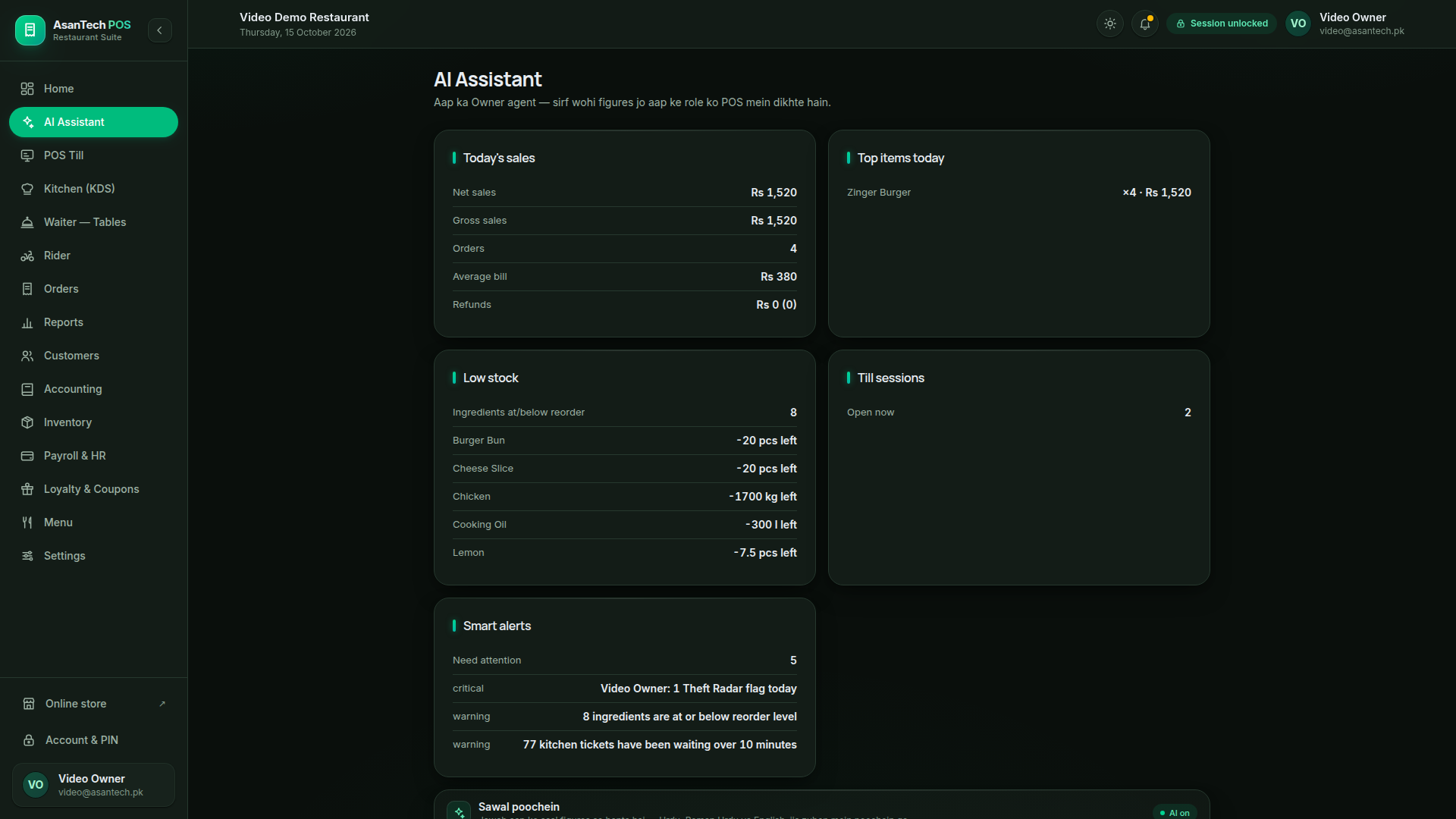
The real Asan panel
Today's sales, low stock and smart alerts in the product's AI Assistant screen — the same panel your staff will open.
Demo data, October 2026.
Full automation
The till, the kitchen, the stock, the accounts and the reports already run as one flow. Asan guides it today; the roadmap adds agents that prepare the next step for the owner to approve.
Till takes the order; Asan guides staff if they ask how.
Live now
Ticket goes to the right section; paper mode keeps service moving.
Live now
Every paid sale deducts the recipe and shows its food cost.
Live now
Roadmap — coming soonStock Agent will draft the purchase order when an item runs low.
Double-entry journals post automatically; the owner P&L reconciles.
Live now
Roadmap — coming soonDaily Reporter will summarise the day in plain words.
The Z-report reconciles to the paisa; a pending bill never counts until it is paid.
Live now
Roadmap — coming soonDemand hints from past sales — what to prep more of tomorrow.
The direction is fixed: every new agent prepares work for a human to approve — Asan will not quietly change money or stock. Automation here means less typing and fewer missed steps, not less control.
The agents
Each agent does one job well. Live agents are marked Live now; everything else is labelled Roadmap, never dressed up as shipped.
How-to help in your language, step by step, on every screen.
Rules-based alerts — low stock, void spikes, long sessions — that arrive even when the AI is off.
Spoken alerts on order payment and key events, English or Urdu, default on.
Will watch stock against sales and draft the purchase order for the owner to approve.
Will close the day with a plain-language summary: sales, food cost, best sellers, what ran out.
The fastest way to understand it is to ask it something on a real setup. Book a demo and we will show the guide, the alerts and the voice on your own business.
This is a promise, not a limitation to hide: Asan does not place orders, change prices, edit stock, void bills or pay anything. Those actions belong to your staff, with their role and PIN. An AI that quietly changes money or stock is not a helper — it is a risk. Asan stays a guide.
Hear Asan on a real till. Request a demo and we will show the guide and the voice alerts on your own business setup.